Row status markers
What the small marker at the end of a product's name means, in the library and every other list of products.
A product whose sheet needs attention carries one small round marker at the end of its name. The same marker appears in the library, on a workplace's product lists, in the RECESS and EMKG assessment lists, and in the VLAREM and risk-assessment product lists. A row with nothing to report has none.
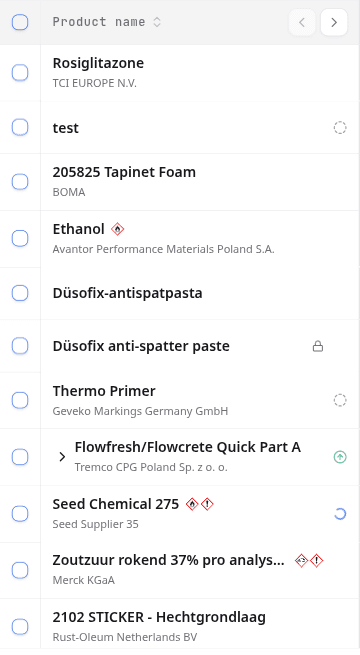
What each marker means
| Marker | Tooltip | What to do |
|---|---|---|
| Orange circle with an exclamation mark | A document on this product could not be processed | Open the product's processing issues. The tooltip offers Open processing issues. |
| Grey dashed circle | No SDS yet | Add the product's sheet. See Choose which safety data sheet a product uses. |
| Blue spinning circle | This document is still being read | Nothing. The row fills in within a few minutes. |
| Faded green circle with an up arrow | A newer revision of this SDS is available | Review it in SDS updates. The tooltip offers Open SDS updates. Shown in the library only. |
| Blue sparkles | SDS Agent is searching | Nothing. The SDS Agent attaches the sheet once it is confirmed. |
| Blue spinner | The SDS is being imported | Nothing. The sheet is ready within a few minutes. |
Hover a marker for its tooltip. Each tooltip ends with Learn more, which opens the page that explains the state.
None of the markers is red, so they cannot be mistaken for a GHS pictogram.
When several apply
A row shows one marker, the most urgent: a sheet that could not be read comes before a missing sheet, which comes before a sheet still being read, which comes before a newer revision. A product counts as unreadable when any of its sheets failed, even if its main sheet is fine.
A padlock beside the name is not a status marker. It marks a Private document, one your team chose to keep out of search across teams. See Team Settings.
What to do next
Filter the library on Document issue or No SDS to list every product that needs a sheet fixed. See Manage your SDS library.