Create a German Betriebsanweisung
Produce a § 14 GefStoffV operating instruction from an SDS, with the eight mandatory blocks and ASR A1.3 safety signs.
§ 14 GefStoffV requires a written operating instruction for every hazardous substance in use, in German, posted where the work happens. NextSDS builds one from the SDS as a second kind of safety card, with the eight blocks the regulation expects.
This template is still marked as a draft, and its blocks are German-only. Every block name and field label prints in German whatever language you use NextSDS in, because the regulation names them.
Start a Betriebsanweisung
The template appears once your team has the German GefStoffV framework switched on. Open a product from your library, select Generate Safety Card, and choose Betriebsanweisung (§ 14 GefStoffV) from the template list.
It is one of the templates NextSDS ships, so it is also a row in SIC Templates. Duplicate it there to keep your own version with your company's blocks and colours.
Choosing it replaces the usual safety card sections with the eight blocks below and sets the card language to German. The printed sheet is headed BETRIEBSANWEISUNG gem. GefStoffV and carries your company name from the SDS supplier.
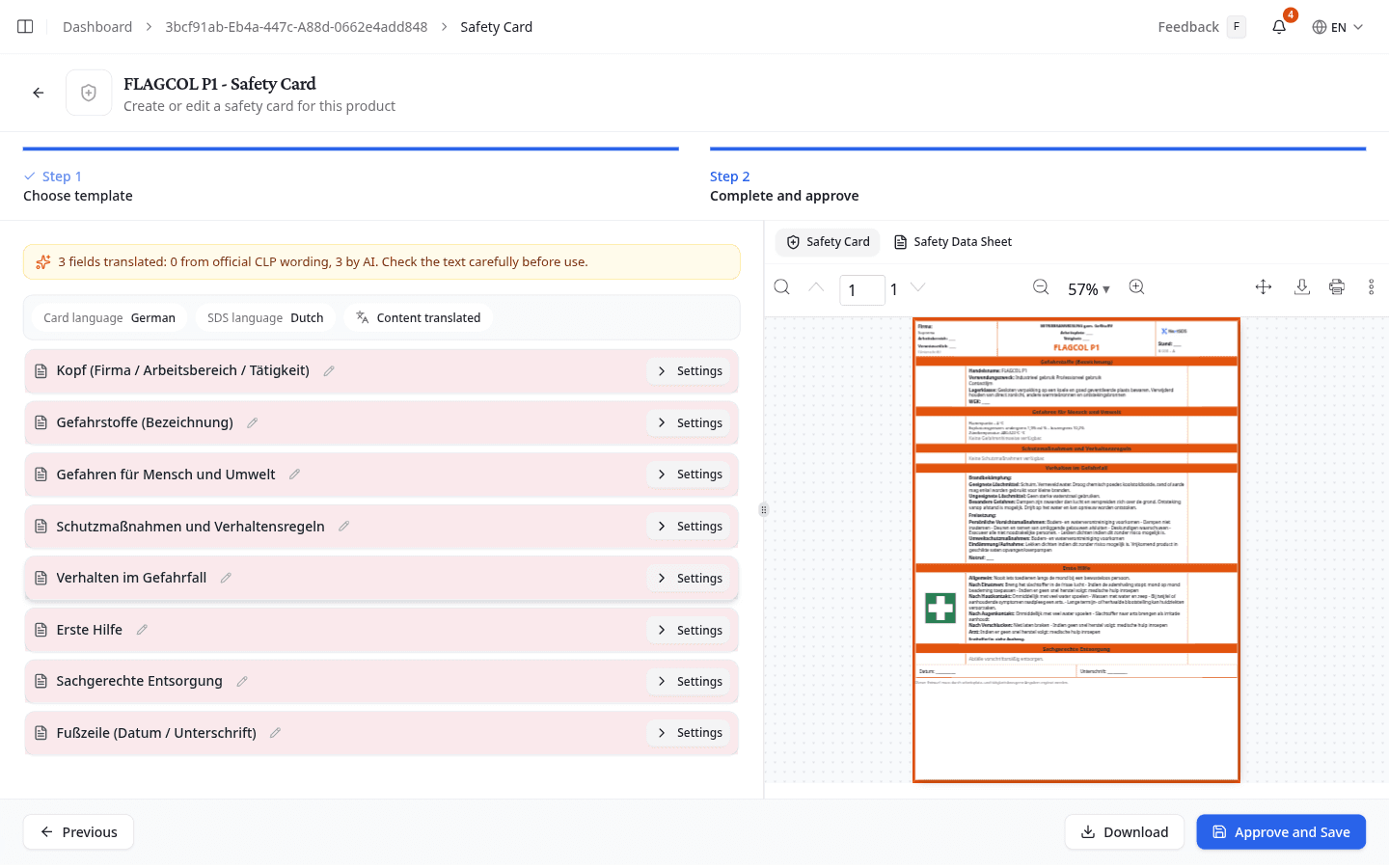
What each block holds
| Block | What it prints | Where it comes from |
|---|---|---|
| Kopf (Firma / Arbeitsbereich / Tätigkeit) | Company, work area, workstation, task, responsible person, revision date, document number | You, apart from the company name |
| Gefahrstoffe (Bezeichnung) | Trade name, intended use, storage class, water hazard class | SDS sections 1 and 7, plus your own storage and WGK values |
| Gefahren für Mensch und Umwelt | GHS pictograms, H and EUH phrases, flash point and explosion limits | SDS sections 2 and 9 |
| Schutzmaßnahmen und Verhaltensregeln | P phrases, respiratory, hand, eye and body protection, technical and organisational measures | SDS section 8, which you can overwrite |
| Verhalten im Gefahrfall | Fire fighting, spill and release measures, emergency number | SDS sections 5 and 6, plus your own numbers |
| Erste Hilfe | Measures per exposure route, first aiders, emergency number | SDS section 4, plus your own |
| Sachgerechte Entsorgung | Disposal route, waste codes, waste contractor | SDS section 13, plus your own codes |
| Fußzeile (Datum / Unterschrift) | Date and signature line | Printed blank for signing |
Each block has a Settings expander holding its switches and its free-text fields, exactly as the standard card does.
Fill in what the SDS cannot say
An operating instruction is site-specific, so the fields that describe your own workplace start empty. Anything you leave empty prints as a rule line, so the sheet is still usable if you complete it by hand at the wall.
Set these yourself:
- Arbeitsbereich, Arbeitsplatz, Tätigkeit and Verantwortlich in the header, plus Stand (Datum) and Dokumenten-Nr.
- Lagerklasse and Wassergefährdungsklasse (WGK). NextSDS falls back to the storage text in SDS section 7 when you leave the storage class empty, and that is usually a paragraph of advice rather than a class number, so enter the class yourself.
- Notruf in both Verhalten im Gefahrfall and Erste Hilfe, and Ersthelfer, which prints "siehe Aushang" until you name someone
- Abfallschlüssel (Substanz) and Abfallschlüssel (Verpackung), the waste codes. Switch on Abfallschlüssel im PDF anzeigen to print them.
- Entsorgungsfirma and its telephone number
- The footer prints a draft disclaimer. Switch Entwurf-Disclaimer anzeigen off once the sheet is approved, or replace the wording under Disclaimer-Text.
The protection measures work the other way round. Atemschutz, Handschutz, Augenschutz and Körperschutz arrive filled from SDS section 8, and Verwendungszweck from section 1. Overwrite any of them where the supplier's wording does not match how the substance is actually handled on your site.
Each free-text field carries Summarize with AI and Translate, which is worth using on supplier wording that runs to a paragraph where a wall sheet has two lines.
Add the safety signs
Every block that takes signs offers the ASR A1.3 and ISO 7010 catalogue, and each one shows only the categories that belong there:
| Block | Sign categories |
|---|---|
| Gefahren für Mensch und Umwelt | Warnzeichen |
| Schutzmaßnahmen und Verhaltensregeln | Gebotszeichen and Verbotszeichen |
| Verhalten im Gefahrfall | Brandschutzzeichen |
| Erste Hilfe | Rettungszeichen |
A short Häufig verwendet list opens first with the signs most sheets need. Alle Zeichen expands the rest, and the search box finds one by name.
Gefahren für Mensch und Umwelt also holds its own GHS pictogram picker. NextSDS ticks the pictograms it read from the SDS; change the selection where the substance as you use it differs from the supplier's classification.
Get the content into German
The template sets the card language to German, but the SDS behind it usually is not German. The block headings print in German straight away while the content stays in the SDS language, so you get German headings over Dutch or French text until you act on it.
Select Translate Content, then Translate All, then Apply Translations. Read the result before you apply it: hazard and precautionary wording is what a worker acts on. Safety Card sections explains how the translation panel works.
What to do next
Download or store the finished sheet from the Safety Card wizard, then post it where the substance is used.