Show an SDS hazard panel on your own website
Copy an iframe that displays a product's signal word, pictograms and H and P statements, and keeps itself up to date.
The panel shows Section 2 only: the signal word, the GHS pictograms, and the hazard and precautionary statements. It leaves out supplier details, composition and the other 14 sections.
Add the SDS to your library first. The embed code reads your team from the library record. Without one, the link it writes is incomplete.
Copy the embed code
- Open the SDS, then select Embed SDS in the options menu.
- Select Copy next to EMBED CODE.
- Paste the code into your page.
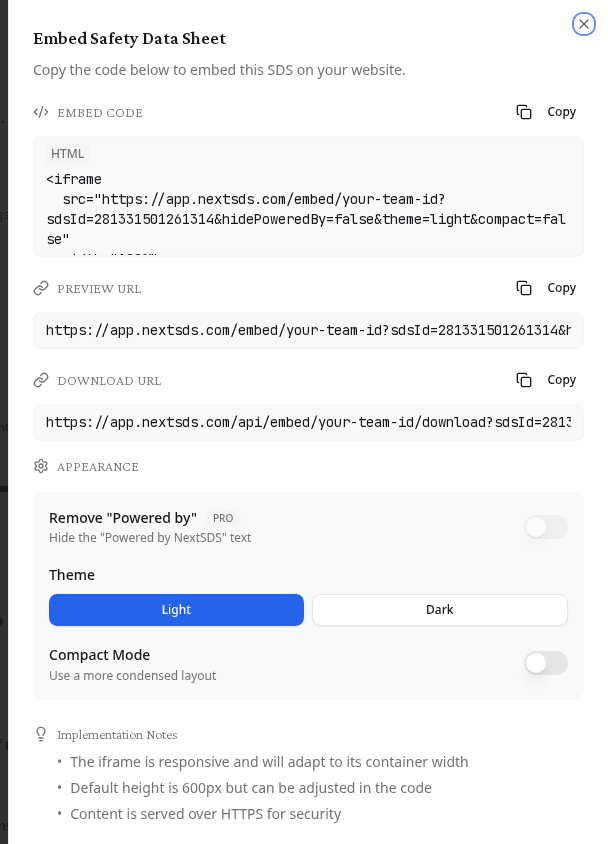
The window offers three values:
| Value | Use it for |
|---|---|
| EMBED CODE | The complete iframe. This is what most sites need. |
| PREVIEW URL | The panel on its own. Open it in a browser to check the result before you publish. |
| DOWNLOAD URL | A direct link to the SDS PDF, for a "Download the safety data sheet" button. |
Anyone with the download URL reaches that SDS without signing in. Treat it as public once you publish it.
Check what your visitors see
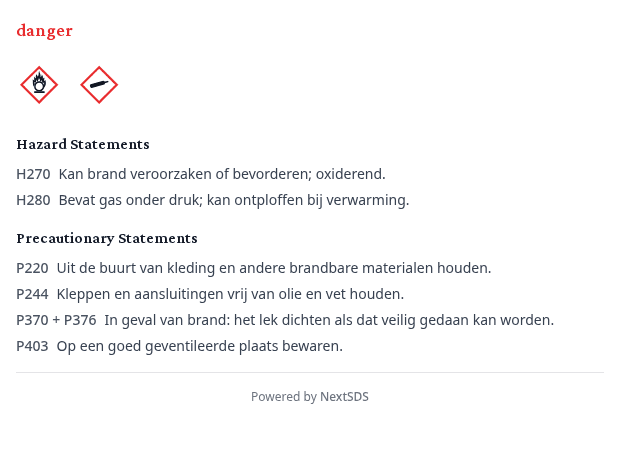
Statements appear in the language of the source SDS, so a Dutch document produces Dutch statements. The two section headings stay in English.
If the product is not classified as hazardous, the panel states that instead, and cites Regulation (EC) No 1272/2008.
Change how the panel looks
| Setting | What it does |
|---|---|
| Remove "Powered by" | Hides the "Powered by NextSDS" line under the panel |
| Compact Mode | Tightens the spacing and the text size, for a narrow column |
Set these before you copy the code. Each one is written into the URL, so a panel you already published keeps the settings it was published with.
The iframe fills the width of its container. Its height is set to 600 pixels, which you can change in the code you pasted.
Keep the panel current
When an SDS changes, you do not have to touch your own site. The panel reads the document you linked, so a new revision reaches your visitors on its own, within a day.
What to do next
Publishing one product at a time suits a catalogue page. To give customers your whole range, open the distribution portal instead.