Fix a document NextSDS could not read
See what went wrong with a document attached to a product, and file it, report it, or remove it.
A document that produced no usable safety data cannot feed a classification, a risk score or a safety card. Until it is dealt with, the product looks incomplete everywhere else in NextSDS.
Open the Processing issues section of the product record. Its icon turns red while the product holds such a document, and the section is empty on a healthy product.
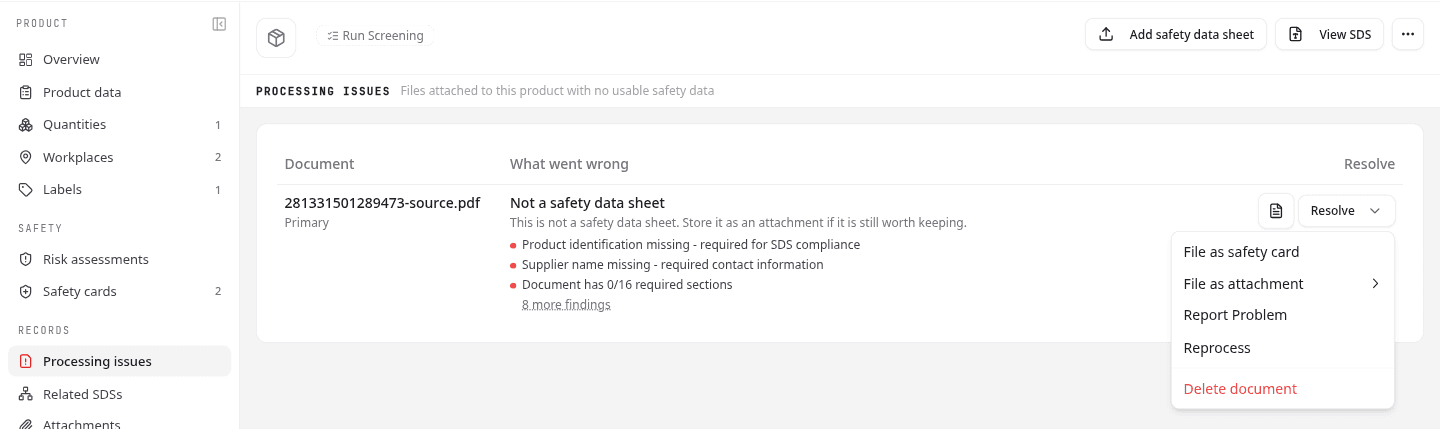
This is the only place these documents appear. Related SDSs and the library list both leave them out, because a file with no usable safety data does not belong in a list of safety data sheets.
Read what went wrong
Each row names the document, its language, and Primary when it is the sheet the product is built on. What went wrong gives the verdict, one line on what it means, and the specific findings behind it.
| Verdict | What it means |
|---|---|
| Extraction failed | NextSDS could not read the file at all |
| Rejected | It looks like a safety data sheet but is incomplete |
| Not a safety data sheet | The file turned out to be something else |
| No data extracted | The file was read but nothing came out of it |
The three most serious findings are listed, with a red dot for a critical one and amber for a warning. A count of the remaining findings follows them, for example 8 more findings. Select it to see the rest, and Show fewer to collapse them again.
A finding is specific rather than a verdict. "Document has 0/16 required sections" tells you what to ask the supplier for.
Choose what to do with it
Open the file first, using the document icon on the row. Every remedy below is a judgement you make after reading it.
Then select Resolve. The order of the options changes with the verdict, so the likeliest remedy comes first.
| Option | Use it when |
|---|---|
| File as safety card | The file is a safety instruction card, which is the commonest thing behind a rejected upload |
| File as attachment | The file is worth keeping but is not a safety data sheet. Pick Non-compliant SDS, Technical data sheet, Certificate, Test report or Other document |
| Report Problem | You think the file really is a proper sheet and NextSDS got it wrong |
| Delete document | The file does not belong on this product |
Filing a document moves it to the Attachments or Safety cards section, where it stays on the product without pretending to be a sheet.
On a Rejected document, ask the supplier for a complete sheet before filing it away. Report it instead if you believe the sheet is complete and the verdict is wrong.
Delete document takes the document off the product. The file itself stays in your file store, so it can be uploaded again.
Team admins also get Reprocess, which reads the file again. Use it once the supplier has fixed the file itself, not to retry an unchanged one. If you do not see it, ask your team admin to check your permissions.
What to do next
Once the product has a sheet NextSDS can read, record where it is stored and how much.