Choose which safety data sheet a product uses
Review the sheets linked to a product, pick the authoritative one, and take up a newer revision, a market variant or a translation.
One product can carry several sheets: an older revision, the same product for another market, a translation. NextSDS treats exactly one of them as authoritative, and every hazard figure on the product comes from that one.
Open the Related SDSs section of the product record.
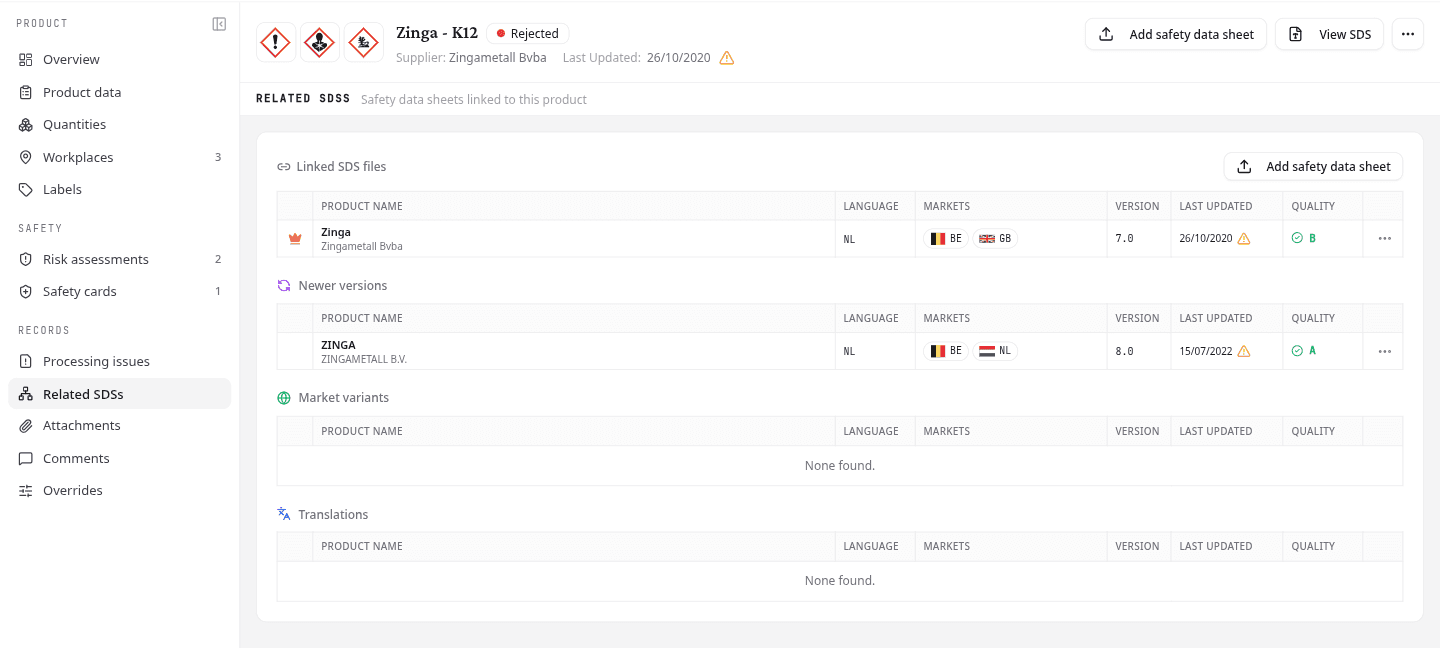
Review the sheets already linked
Linked SDS files lists every sheet attached to this product, with its language, target markets, version, revision date and quality grade. A crown marks the authoritative sheet.
Add safety data sheet, beside the heading, uploads a sheet you already hold: a translation, a market variant, or a revision the supplier sent you directly rather than one NextSDS found on its own. It attaches to this product instead of creating a second one. The same action sits in the product header.
The options menu on a row holds:
| Action | What it does |
|---|---|
| SDS Details | Open the data NextSDS read out of this sheet |
| View PDF | Open the original file |
| Make Primary | Make this the authoritative sheet for the product |
| Archive SDS | Take the sheet out of the list without deleting it |
| Remove from Product | Unlink the sheet from this product |
On any sheet that is not the authoritative one, the menu also holds Compare with Primary, which opens the version comparison.
Archived sheets move into their own Archived SDSs group, which appears only when the product has one. There, Archive SDS reads Unarchive SDS.
A warning triangle beside a revision date means the sheet is more than three years old. Use it to spot products due a refresh even when no newer revision has turned up yet.
Take up a newer revision, variant or translation
Three further sections show what NextSDS found elsewhere in its database for this product. Each reads None found. when there is nothing to show.
- Newer versions: a later revision of the same sheet
- Market variants: the same product issued for another country
- Translations: the same sheet in another language
The options menu on those rows holds SDS Details and View PDF, plus one action that depends on which section it sits in. Under Newer versions it reads Compare and replace, because a later revision supersedes what you hold. Under Market variants and Translations it reads Compare and add, because those sit alongside the sheet you already have rather than replacing it.
Both open the comparison first, so you see what changed before anything on the product changes.
Add the first sheet to a product
A product recorded before its sheet arrived shows No safety data sheet linked yet. Select Search for a sheet to look in the NextSDS database first, since the sheet may already be there. If it is not, upload it and NextSDS attaches it to this product rather than creating a second one.
What to do next
With the right sheet in place, record where the product is stored and how much.