Classify a chemical mixture
Enter a mixture's components and read back its CLP classification, its label elements per jurisdiction, and its transport classification per mode.
Nothing is saved and there is no Calculate button. The classification recomputes every time you change the composition, and the status line above the results tells you when it last ran.
This classification tool is under active development. Always verify results with a qualified regulatory compliance expert before using them on Safety Data Sheets, product labels, or regulatory submissions.
Describe the mixture
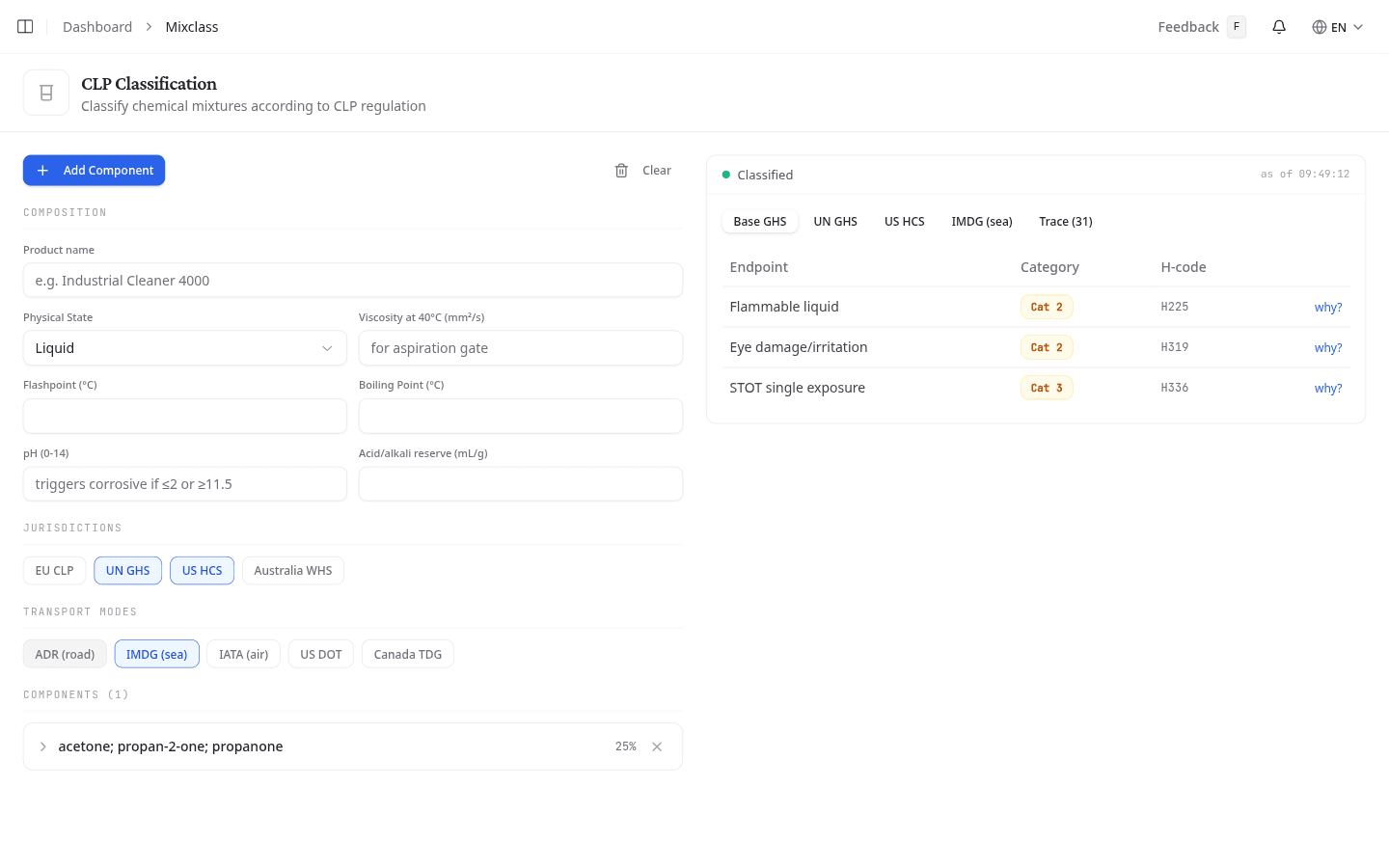
Fill in what you know under Composition. Every field is optional except the components themselves.
| Field | Why it matters |
|---|---|
| Product name | Names the mixture in the results. |
| Physical State | Liquid, Solid, Gas, Aerosol, Paste or Powder. Decides which physical hazard classes apply at all. |
| Viscosity at 40°C (mm²/s) | Decides the aspiration hazard. |
| Flashpoint (°C) | Classifies flammability. |
| Boiling Point (°C) | Separates the flammable liquid categories. |
| pH (0-14) | A pH of 2 or lower, or 11.5 or higher, triggers a corrosive classification. |
| Acid/alkali reserve (mL/g) | Overrides the pH shortcut where the reserve shows the mixture is weakly buffered. |
Pick the jurisdictions and transport modes
Each jurisdiction you switch on adds a tab to the results. EU CLP, UN GHS and US HCS start on, Australia WHS does not.
Transport modes work the same way. ADR (road) and IMDG (sea) start on, and IATA (air), US DOT and Canada TDG are there when you need them.
Add the components
Select Add Component, type a CAS Number and a Concentration (%), then select Look up. NextSDS searches the CLP Annex VI harmonised list and shows you the substance with its EC and Index numbers and its harmonised hazard classes.
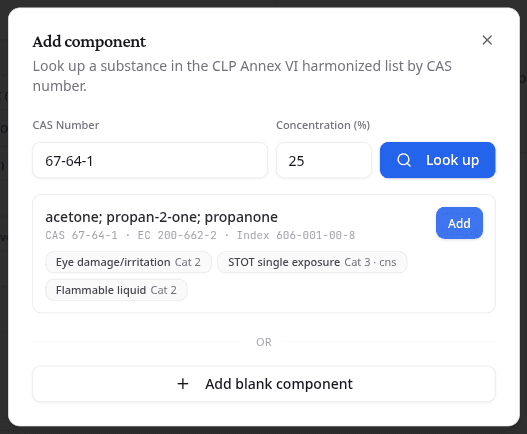
Select Add to put that substance in the mixture. If the CAS number is not in Annex VI, select Add blank component and enter the hazard data from the supplier's sheet yourself.
Expand a component to record the data the generic thresholds cannot cover: acute toxicity estimates, M-factors for substances that are very toxic to aquatic life, specific concentration limits that override the CLP defaults, and the aquatic toxicity results behind an environmental classification.
Clear empties the whole composition and asks first.
Read the classification
Base GHS lists every endpoint that classified, with its category and H-code. Select why? on a row to see which rule and which concentration threshold produced it.
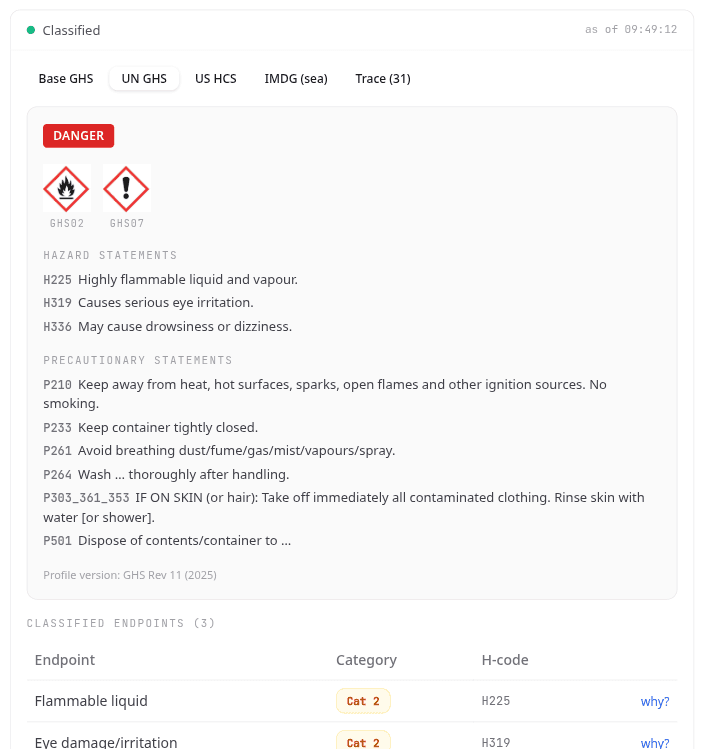
Each jurisdiction tab turns that into a label: the signal word, the pictograms that survive the CLP precedence rules, the Hazard statements and the Precautionary statements. The Profile version at the foot of the card records which ruleset version answered.
Read the transport classification
Each transport mode tab gives you the dangerous-goods entry for that mode: UN number, Proper shipping name, Class, Subsidiary risk, Packing group, Labels, and whether the mixture counts as a Marine pollutant or is Environmentally hazardous.
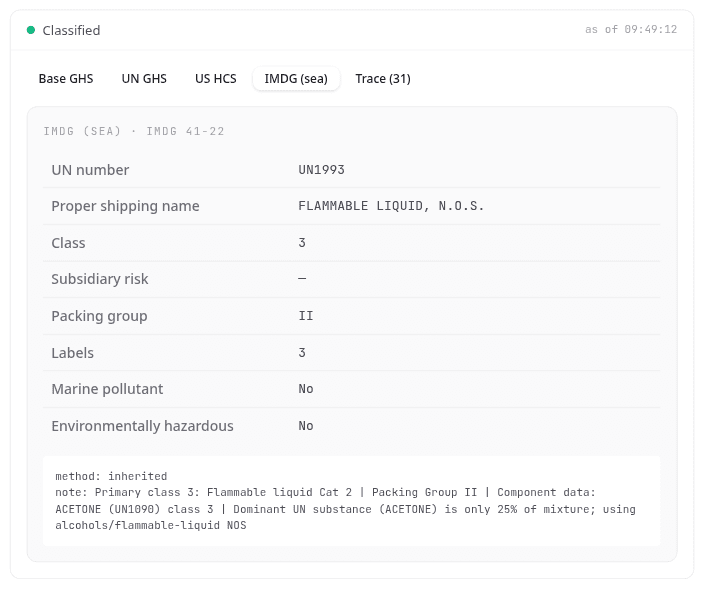
The note underneath explains how the entry was chosen. It matters when no single component dominates, because the answer then falls back to a general entry rather than the pure substance's own UN number.
Follow the calculation
Trace records every step: which threshold was tested, which rule fired, and which hazard classes were ruled out. Keep it as your evidence when an inspector asks how a classification was reached.
Start from a sheet you already have
Only team admins see this entry point. If you do not see Classify (CLP), ask your team admin to check your permissions.
Open the options menu on a library row and select Classify (CLP). The composition arrives prefilled from that SDS, under a banner naming the sheet it came from.
Read the mapping warnings on that banner before you trust the result. They tell you which values could not be read cleanly out of the sheet.
What to do next
Check what each hazard level means for the products in your library.