Choose the PPE for a product
Decide per body area what workers wear when they handle a product, with the safety data sheet's section 8 beside each choice.
What you choose here is what the product's safety cards print and what each risk assessment starts from.
Open a product and select PPE in its menu.
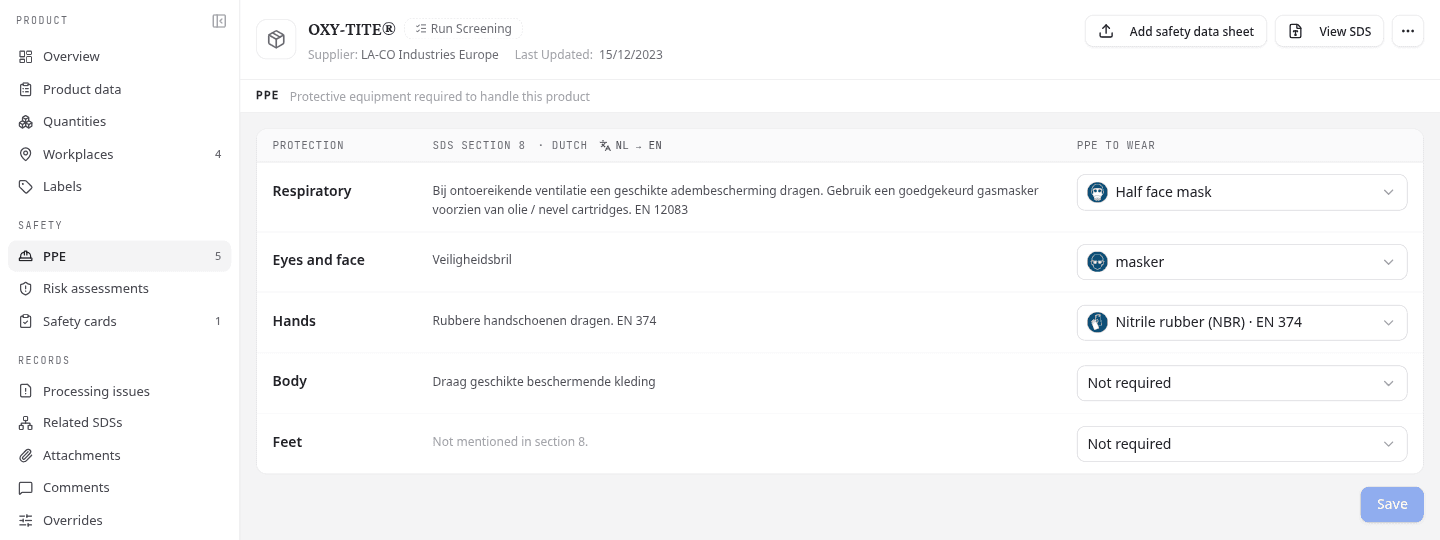
Choose PPE per body area
Each row is one body area: Respiratory, Eyes and face, Hands, Body, Feet and Head.
- Read what the sheet asks for under SDS section 8.
- Under PPE to wear, choose an item from your team's PPE catalogue, or Not required.
- Select Save.
The sheet is there for reference. NextSDS never picks PPE from it for you.
If the sheet is in another language, select the language switch beside SDS section 8 (for example NL → EN) to read it in yours.
To clear an area, choose the item that is already selected again.
The PPE column in your library shows each product's PPE at a glance. If your segment hides it, show it under Columns.
Add PPE that is not in your catalogue yet
Choose the last row of the list. It reads Create followed by an item when section 8 suggests one for that area, and New PPE… when it does not. Either opens the same window as in Settings > PPE catalogue, filled in from the sheet where it can. The new item joins your team's catalogue and is chosen for this area.
To change the catalogue itself, select Manage PPE. It opens in a new tab, so your unsaved choices here stay put.
Where the standard PPE comes in
An area the product has no choice for starts with your team's standard PPE, for example safety shoes under Feet. Change it like any other choice. When you select Save, every area is stored as the product's own choice.
PPE that differs at one workplace
This applies only to teams that use the Risk Evaluation framework.
A workplace can need different PPE for the same product, for example a full face mask where the product is sprayed. That choice is made in the workplace's risk assessment, which starts from the product's PPE and stores only what differs.
Those workplaces are listed under Different in risk assessments. Select Open risk assessment to change one. In the risk assessment, Selected at product level marks the product's own choice.
When you change the product's PPE, workplaces that had the same PPE as the product follow the change. Workplaces with a different choice keep their own.
What to do next
Print the PPE on a safety card.