Set up your team's PPE catalogue
Record the protective equipment your team uses, so it can be chosen per product and printed on safety cards.
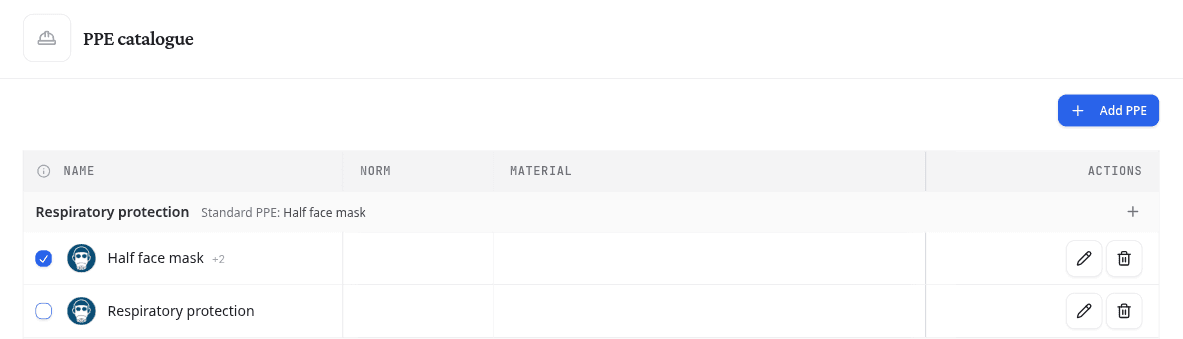
Every product's PPE is chosen from this catalogue, so a glove or mask you add here becomes available on every product, in every risk assessment and on every safety card. The catalogue is grouped by type of protection: respiratory, eyes and face, hands, body, feet and head.
Open Settings > PPE catalogue. On a product's PPE page, Manage PPE opens it in a new tab.
Add PPE to the catalogue
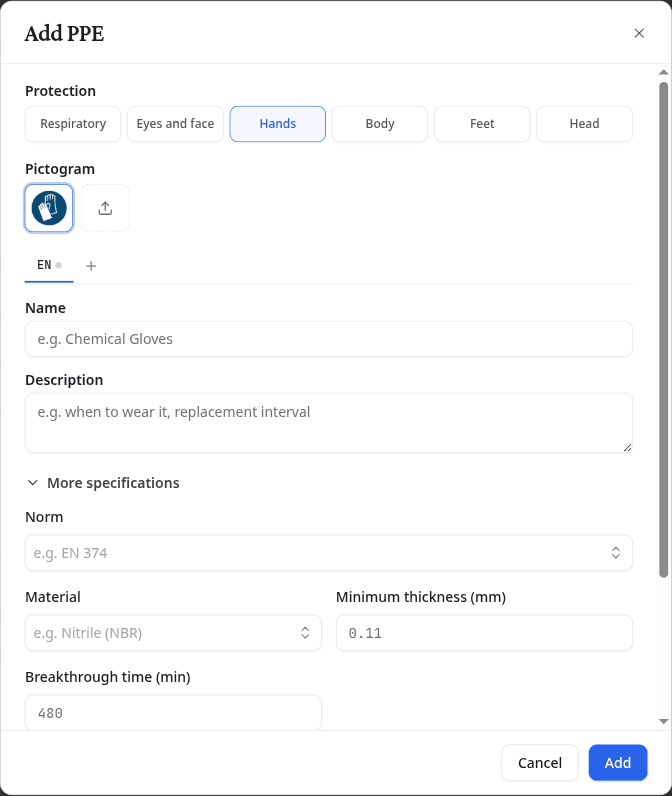
- Select Add PPE, or the + on the band of the protection type you want.
- Under Protection, choose the body area it protects.
- Keep the suggested Pictogram, or upload your Own image.
- Enter a Name, and a Description if workers need to know when to wear it or how often to replace it.
- Open More specifications to record the Norm, Material, Brand and model and the properties that apply to that area, such as breakthrough time for gloves or filter type for respiratory protection.
- Select Add.
You can also add PPE while choosing it on a product. The last row of each list opens the same window. When section 8 suggests something for that area, the row reads Create followed by that item, and the window starts filled in from the sheet. When the sheet says nothing about the area, New PPE… takes its place.
Name PPE in every card language
A safety card prints each PPE name in the card's language. Select + beside the language tabs to add a language, then enter the name in it. Translate fills the name from a language you already have. Check the result before you save.
When a name is missing in a language, NextSDS shows the name it has, tagged with its language code, for example NL.
Set the standard PPE
Standard PPE is what everyone wears everywhere on site, such as safety shoes or workwear. Tick the box in front of an item to make it the standard for its protection type. Each type has at most one, and its band names it.
Standard PPE is filled in on every product that has no choice of its own for that area. It stays changeable on each product.
Edit or delete PPE
Select the pencil icon on a row to change it, or the bin icon to delete it.
Deleting PPE removes it from every product that uses it.
What to do next
Choose the PPE for a product from this catalogue.