Open a product record
Find your way around a product's sections and read what the overview summarises.
A product links one or more SDS documents to your real inventory: how much you store, where, and whether it has been screened. The record is split into sections, and one list moves you between them.
How to get here
Select View Product on any library row. Rows with no product record show View PDF instead, which opens the SDS file directly.
Move between a product's sections
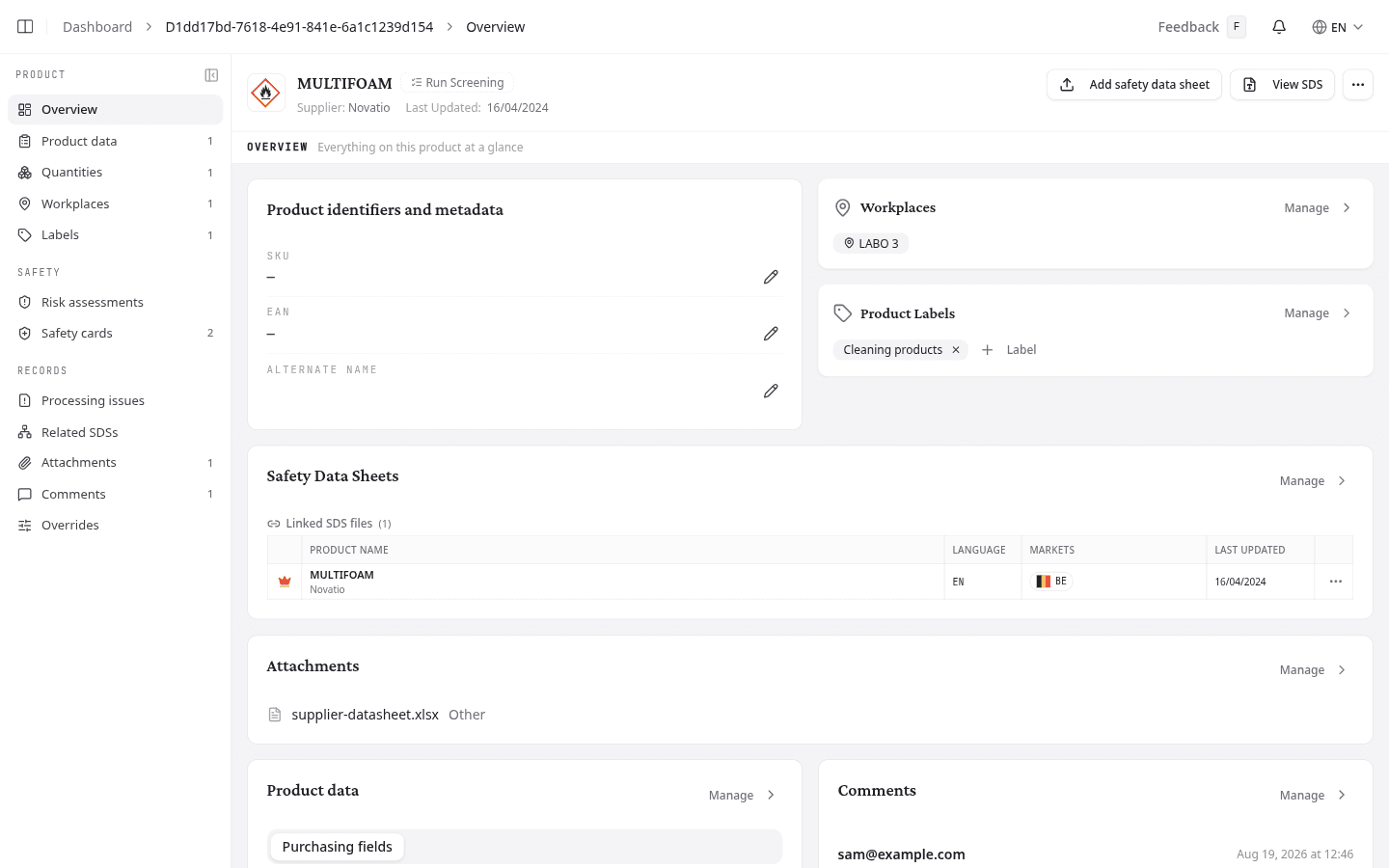
The section list groups twelve sections under three headings.
| Group | Sections |
|---|---|
| Product | Overview, Product data, Quantities, Workplaces, Labels |
| Safety | Risk assessments, Safety cards |
| Records | Processing issues, Related SDSs, Attachments, Comments, Overrides |
A number beside a section counts what it holds, so you can see there are three workplaces or two safety cards without opening either. Processing issues turns red when the product holds a document NextSDS could not read.
Select Collapse navigation to shrink the list to icons alone, and Expand navigation to bring the names back. Drag its right edge to make it wider or narrower. NextSDS remembers the setting for your next visit.
Read the product header
The header stays in place on every section, so the product's hazards travel with you.
- Up to three GHS pictograms from the primary SDS, or a plain box icon when the sheet lists none
- The product name, with the supplier and the date of its most recent sheet
- View SDS to open the PDF
- Add safety data sheet, for attaching a sheet to this product. It stands out while the product has no sheet at all, and becomes a plain button once it has one
A dashed Run Screening badge means nobody has screened this product. Once someone decides, the badge reads Review, Accepted or Rejected and reports the outcome without reopening the check. See Screen a product before it arrives.
An Archived badge means the product is hidden from the active library list.
Read the overview
The overview summarises the whole record so you can judge a product without opening six sections. Each card carries Manage, which opens the matching section.
Product identifiers and metadata holds the product's own codes: your internal product code, its barcode number, and an alternate name. Select the pencil beside any of them to edit it in place.
Safety Data Sheets lists the sheets linked to the product, with a crown on the one NextSDS treats as authoritative. When a newer revision exists, a Newer version available link takes you to the comparison.
Record custom fields, comments and labels
Three sections keep the details your team adds by hand. Their overview cards are read-only, so make changes on the section itself.
| Section | What you record there |
|---|---|
| Product data | The custom field forms your team has set up. Each form appears under its own name, so what you see depends on your own setup. |
| Comments | Notes for your colleagues, up to 500 characters each. |
| Labels | The labels applied to this product. Select Add Label to apply one, or type a name and select the Create option that appears. |
What to do next
Check that the product is built on the right sheet: choose which safety data sheet a product uses.