VLAREM product classification
See every product with its rubriek classification, and correct one where NextSDS got it wrong.
The Products tab lists every product with its rubriek classification. Use it to find which products drive your permitted situation.
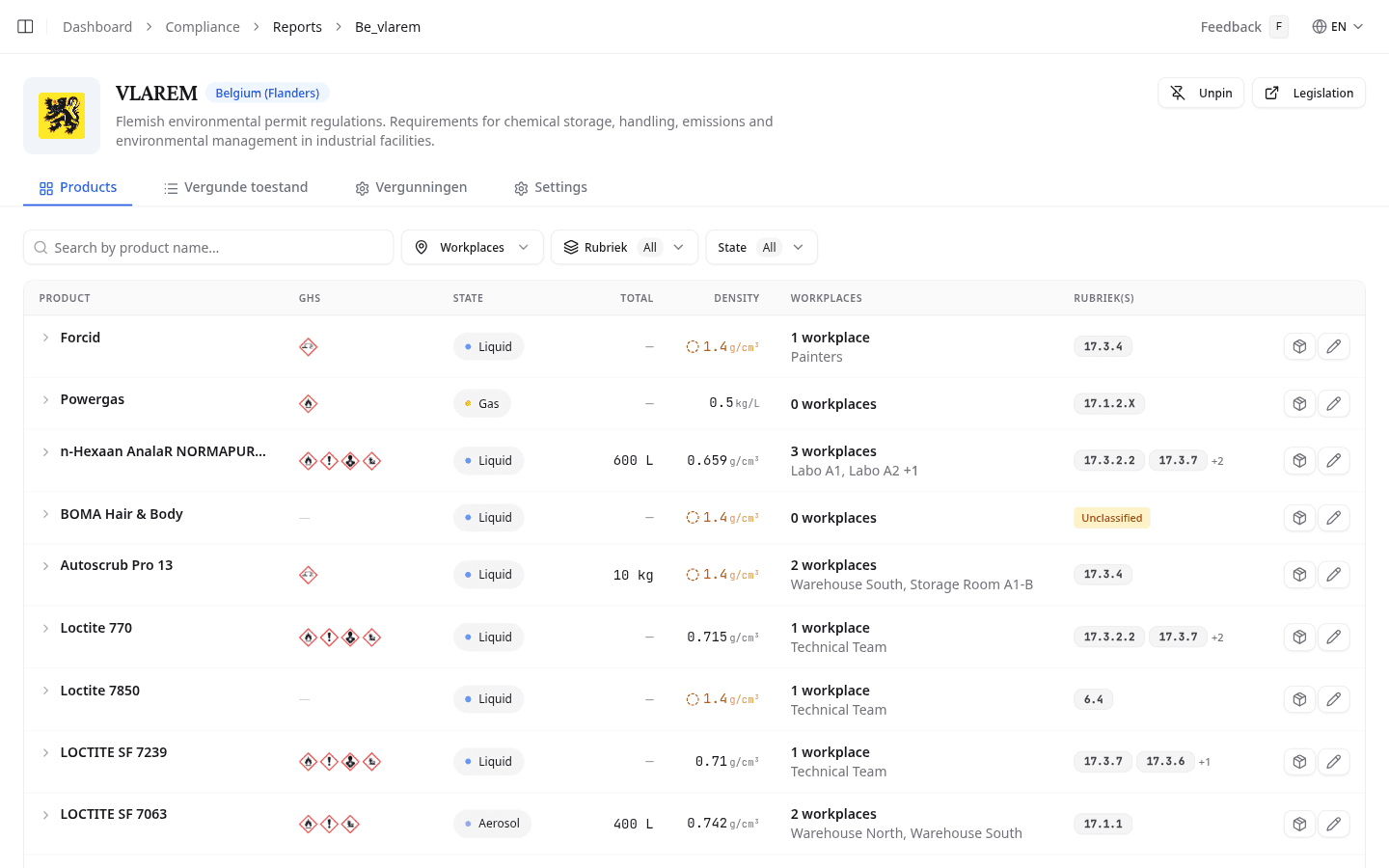
Read the product table
| Column | What it shows |
|---|---|
| Product | Product name |
| GHS | GHS pictograms |
| State | Physical state used for the VLAREM calculation |
| Total | Total stored amount across workplaces |
| Density | Density used for the calculation. A dotted marker means the team fallback density applies. |
| Workplaces | The workplaces that store this product |
| Rubriek(s) | The rubriek or rubrieken this product falls under |
Search by product name, or filter by workplace, rubriek, or state. An Unclassified badge means NextSDS found no rubriek for the product yet.
Correct a rubriek by hand
Select the pencil on a row to correct its rubriek by hand, or the box icon to open the product.
Check the breakdown per workplace
Expand a row for the breakdown per workplace, with each workplace's recipient, type, and number of packages. Manage quantities on a workplace row adjusts the amounts stored there.
What to do next
Check whether these products may stand beside each other on the Opslag tab.